
Want an easier way to define new words?
You know that Urdu copy of Harry Potter you’ve been meaning to read, but you find yourself spending more time looking up words you don’t understand than actually reading. It takes such a long time to type out and look up each word.
Would you be surprised to learn there is an easy way to take a picture of a page of underlined words and have each word defined for you in just seconds? Let us show you how it’s done.
We will show you using the Claude app:
Open the free Claude app by Anthropic.
Tap the plus.
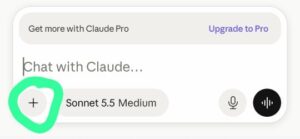
Tap camera.
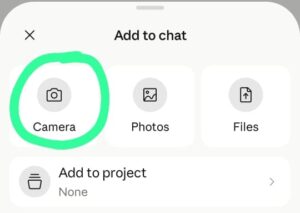
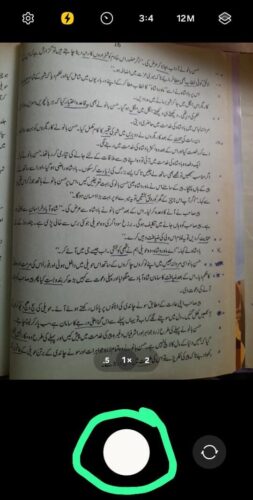
Make sure you have good lighting and take a picture of the Urdu page with your camera.
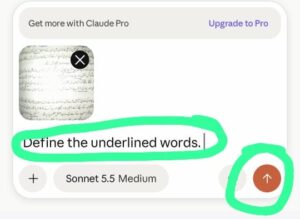
The picture you took will be added as an attachment. Type, ‘Define the underlined words.’ Then tap the up arrow.
Claude will after just a few seconds give you results. The way the results are given can vary each time. You can get consistent results by using the same chat over again following the same steps. It also can be helpful to give more context. Such as in the sample results below.
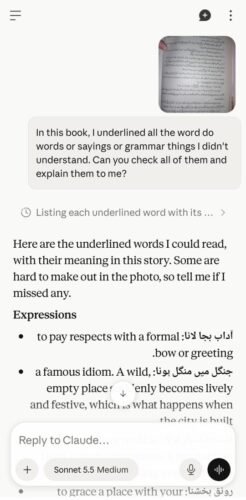
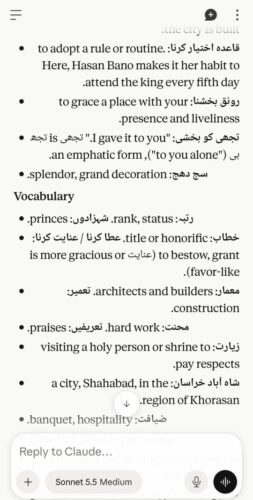
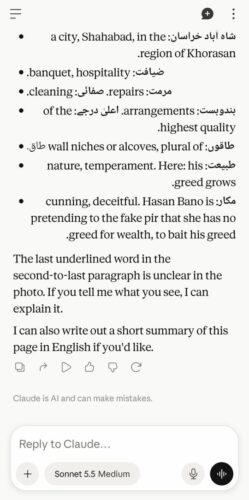
Inevitably a few words are missed by Claude or it might give the wrong word so be sure to double check. Usually the clearer the picture the better the results. You can also use Gemini or ChatGPT, but Claude typically misses fewer words.
This is a great way to go over the tricky vocab words from your reading! One way to then level up your newly acquired words is for a trained teacher to guide you how to correctly use them grammatically and culturally. Teachers can provide real-life examples, and give you practice in using the words in your daily speech. We welcome you to sign up for your classes with one of our teachers for that!